|
|
MeBoy Builder Java Game
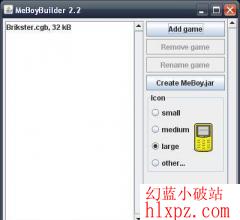
Since mobile phones don't handle files in the same way computers do, you must include the ROM files in the game's '.jar' file before playing. Don't worry though, MeBoyBuilder automates the process (don't be intimidated by the list, it's really quite simple):
1. Make sure you have Java installed on your computer, version 1.5 or later.
2. Download MeBoyBuilder.jar.
3. Run MeBoyBuilder.jar by double-clicking.
4. Press the 'Add ROM' and select a ROM file. Repeat for all games you want to add (some phones do not accept very large '.jar' files though).
5. Press the 'Finish' button. The file MeBoy.jar is created for you (in the same directory as MeBoyBuilder.jar, or your browser's default directory).
6. Copy MeBoy.jar to your phone. If the phone accepted the file, you're done! Otherwise, read on:
7. Some phones want a '.jad' file, which is a text file with info about the '.jar' file. MeBoy.jad is created for this reason. (If your phone accepted MeBoy.jar, you do not need MeBoy.jad and can safely throw it away.)
NOTE: you can download a ROM in here romhustler roms/gbc
  |
|



 发表于
发表于